
Find a lost dog or cat with the drone you already have
Animal Drone Rescue AI is a free, non-profit app. It plans the search around the place where your pet was last seen, flies the route while you stay in control, and its AI flags every possible animal in the footage: live, or afterwards from any drone's memory card.
App Store · coming soon Google Play · coming soon
iPhone first. Android is on the way. See the compatible drones.

There is a dog in this photo. Can you spot it? A real frame from one of our test flights.
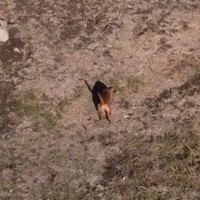 The AI marked it in about a seventh of a second on an iPhone 15 Pro.
How a search works
- Mark the last place your pet was seen. On the web or in the app. Sightings from neighbours go on the same map.
- Let the app draw the search. Parallel lines, an expanding square, a spiral, a sector from the last known point, or along a road or a river. It checks the terrain, the trees and the known power lines, and suggests a safe height: 20 to 25 m is where a dog-sized animal still shows up clearly.
- Fly it with your hands on the controller. The drone follows the route. You can pause, take over or bring it home at any moment.
- Review what the AI found. Every possible animal comes with a close-up and its spot on the map. Confirm it or discard it, and go and look.


Screens from the iPhone app. The app is in Spanish for now; English and the other languages come with the store release.
What a lost dog looks like from the air
Small, and easy to miss after an hour of footage. These are frames from our own test flights, with the animal marked.


Works with your drone
On iPhone, the app flies the DJI drones that support DJI's older developer kit, such as the Mavic Mini, Mini 2, Mavic Air 2 or Air 2S. Flying the Mini 3 and the Mini 4 Pro is planned for Android, the only system DJI supports for them. With every other drone (Mini 5 Pro, Air 3S, Neo, Autel, Parrot or a budget camera drone) you fly as usual, record, and let the app go through the memory card afterwards.
Free, non-profit, and your footage stays with you
- No subscription, no ads, no in-app purchases.
- The AI runs on your phone. Your videos are not uploaded to analyse them.
- If you link the app to a search on the web, it shares the route and a small close-up of each possible animal, so the owner can check them from home.
Fly within the rules
A search flight is still a drone flight. Keep the drone where you can see it, stay below 120 m (400 ft), keep away from people and airports, and check the rules where you fly. The app warns you, but the pilot decides.
Do you fly a drone?
Lost-pet groups often ask for someone with a drone nearby. One hour of your time over a field can end days of searching for a family. How to help as a volunteer pilot.
Questions
Is it really free?
Yes. No price, no subscription, no ads and no in-app purchases. It is a non-profit project.
Which phones does it work on?
iPhone with iOS 15 or later. The Android version is in progress.
Do I need internet?
To prepare the search, yes: the app downloads the map, the terrain and the power lines for the area. Once the area is prepared, the flight and the AI work without coverage.
Do I need a thermal camera?
No. In daylight a normal camera works when the animal is in the open. Under trees or at night a thermal camera sees more, but the AI is trained on normal colour video and does not analyse thermal footage yet.
How reliable is the AI?
In our own test set of 30 aerial frames with a dog and 139 without one, the analysis on a computer found 29 of the 30 dogs with 6 false alarms. It will miss things and it will flag rocks and bags: it narrows the search, it does not replace looking.
Is it legal to search with a drone?
It depends on the country, and on where and when you fly. Read the rules for your country.
Share this page
WhatsApp · Facebook · X · Telegram · Reddit · Email ·
Ask an AI about it: ChatGPT · Claude · Perplexity · Google AI Mode